노드 리소스 수집까지 완료했다면, 이번 편에서는 물리 디스크 상태 모니터링을 다룹니다. 서버 장애의 상당수는 디스크 문제에서 시작되기 때문에 SMART 데이터 모니터링은 예방적 유지보수의 핵심입니다.
수집 대상 API 경로
| 수집 항목 | API 경로 |
|---|---|
| 노드의 디스크 목록 | /api2/json/nodes/{node}/disks/list |
| 디스크 SMART 상세 | /api2/json/nodes/{node}/disks/smart?disk=/dev/sda |
두 API 모두 해당 노드에 직접 요청해야 합니다. 클러스터 API를 경유하면 정확한 로컬 디스크 정보를 얻을 수 없습니다.
또한 이 API는 Sys.Audit 권한이 필요합니다. 4편에서 권한을 올바르게 설정했다면 정상 동작합니다.
디스크 LLD 구현
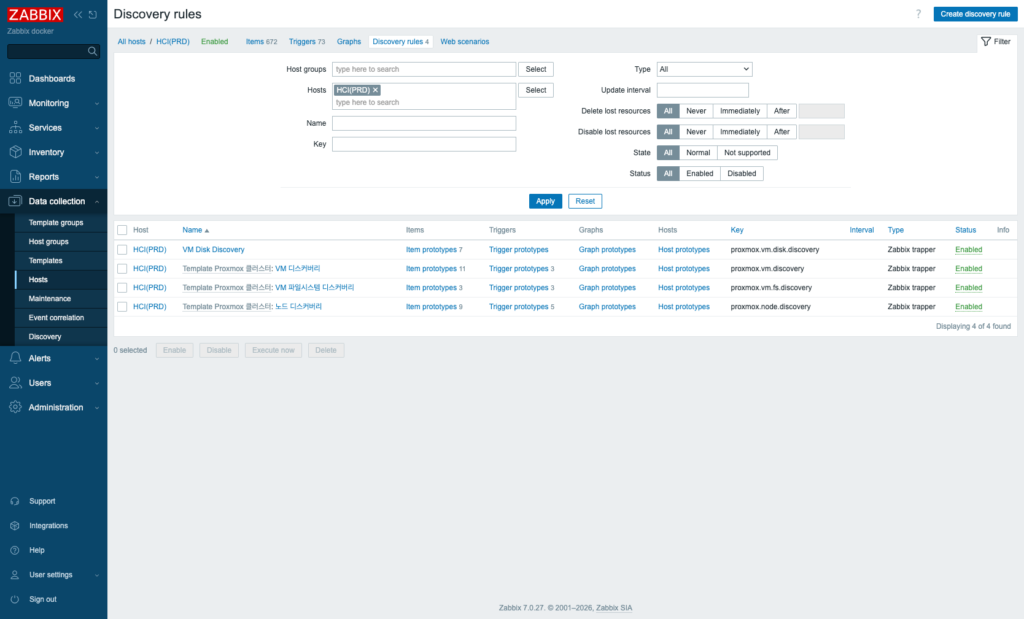
디스크 수와 구성은 노드마다 다르기 때문에 LLD로 자동 발견합니다:
def do_disk_discovery():
    nodes_data = api("/api2/json/cluster/resources?type=node")
    lld = []
    for n in nodes_data:
        if n.get("status") != "online":
            continue
        node = n["node"]
        ip   = NODE_IPS.get(node)
        disks = api(f"/api2/json/nodes/{node}/disks/list", node_ip=ip)
        if not disks:
            continue
        for dk in disks:
            devpath = dk.get("devpath", "")
            devname = devpath.replace("/dev/", "")
            lld.append({
                "{#NODE}":    node,
                "{#DISK}":    devname,
                "{#MODEL}":   dk.get("model", ""),
                "{#SIZE_GB}": dk.get("size", 0) // 10**9,
                "{#USED}":    dk.get("used", ""),
            })
    send_single("proxmox.node.disk.discovery", json.dumps(lld))
Discovery JSON 예시:
[
  {"{#NODE}": "pve11", "{#DISK}": "sda", "{#MODEL}": "SAMSUNG MZ7LH960", "{#SIZE_GB}": 960, "{#USED}": "ZFS"},
  {"{#NODE}": "pve11", "{#DISK}": "sdb", "{#MODEL}": "SAMSUNG MZ7LH960", "{#SIZE_GB}": 960, "{#USED}": "ZFS"},
  {"{#NODE}": "pve12", "{#DISK}": "sda", "{#MODEL}": "HGST HUS726060AL", "{#SIZE_GB}": 6000, "{#USED}": ""}
]
{#USED} 매크로로 디스크의 현재 용도(ZFS, LVM 등)를 파악할 수 있어 아이템 이름에 표시하면 구분이 쉽습니다.
SAS vs SATA/NVMe: 응답 형식의 차이
SMART 데이터를 수집할 때 가장 중요한 점은 드라이브 타입에 따라 응답 형식이 다르다는 것입니다.
SAS 드라이브 — text 형식
smart = api(f"/api2/json/nodes/{node}/disks/smart?disk=/dev/sda", node_ip=ip)
# smart["type"] == "text"
# smart["text"] == "... Current Drive Temperature: 38 C ..."
SAS 드라이브는 smartctl의 텍스트 출력을 그대로 반환합니다. 정규표현식으로 파싱합니다:
import re
def parse_smart_text(text):
    temp, defect = None, None
    for line in text.splitlines():
        # SAS 온도
        m = re.search(r"Current Drive Temperature:\s+(\d+)", line)
        if m:
            temp = int(m.group(1))
        # SAS Grown Defect (불량 섹터 누적)
        m = re.search(r"Elements in grown defect list:\s+(\d+)", line)
        if m:
            defect = int(m.group(1))
        # ATA 형식 온도 (일부 드라이브)
        m = re.search(r"Temperature_Celsius.*?(\d+)\s*$", line)
        if m and temp is None:
            temp = int(m.group(1))
    return temp, defect
Elements in grown defect list 는 SAS 디스크에서 중요한 지표입니다. 불량 섹터가 증가하면 드라이브 교체를 검토해야 합니다.
SATA/NVMe 드라이브 — attributes 형식
smart = api(f"/api2/json/nodes/{node}/disks/smart?disk=/dev/sdb", node_ip=ip)
# smart["type"] == "ata" 또는 "nvme"
# smart["attributes"] == [{"name": "Temperature_Celsius", "value": 38, ...}, ...]
구조화된 속성 배열로 반환됩니다:
temp = defect = None
for attr in smart.get("attributes", []):
    name = attr.get("name", "")
    if "Temperature" in name and temp is None:
        try:
            temp = int(attr.get("value", 0))
        except (ValueError, TypeError):
            pass
    if "Reallocated" in name and defect is None:
        try:
            defect = int(attr.get("raw", 0))
        except (ValueError, TypeError):
            pass
SATA에서는 Reallocated_Sector_Ct(재할당 섹터 수)가 불량 섹터 지표입니다. 이 값이 0보다 크면 주의, 증가 추세라면 교체를 준비합니다.
전체 수집 흐름
def collect_node_disks(n):
    node = n["node"]
    ip   = NODE_IPS.get(node)
    result = []
    disks = api(f"/api2/json/nodes/{node}/disks/list", node_ip=ip)
    if not disks:
        return result
    for dk in disks:
        devpath  = dk.get("devpath", "")
        devname  = devpath.replace("/dev/", "")
        # 1. Health (disks/list에서 직접 제공)
        health_str = dk.get("health", "UNKNOWN")
        health_val = 0 if health_str == "OK" else (1 if health_str != "UNKNOWN" else -1)
        result.append(sl(f"proxmox.node.disk.health[{node},{devname}]", health_val))
        # 2. SMART 상세 (온도, defect)
        smart = api(f"/api2/json/nodes/{node}/disks/smart?disk={devpath}", node_ip=ip)
        if not smart:
            continue
        if smart.get("type") == "text":
            temp, defect = parse_smart_text(smart.get("text", ""))
        else:
            temp = defect = None
            for attr in smart.get("attributes", []):
                # ... 위와 동일한 파싱 로직
        if temp is not None:
            result.append(sl(f"proxmox.node.disk.temp[{node},{devname}]", temp))
        if defect is not None:
            result.append(sl(f"proxmox.node.disk.defect[{node},{devname}]", defect))
    return result
Health 값 설계:
| health 문자열 | 저장 값 | 의미 |
|---|---|---|
| OK | 0 | 정상 |
| UNKNOWN | -1 | 상태 불명 (트리거 제외) |
| 그 외 (degraded 등) | 1 | 이상 |
UNKNOWN을 -1로 저장하는 이유는 오탐 방지입니다. 일부 환경에서는 디스크 정보를 조회할 수 없는 경우(가상 디스크, 특정 HBA 구성)에 UNKNOWN이 반환됩니다. 이를 1(이상)로 처리하면 불필요한 알림이 발생합니다.
병렬 수집 (ThreadPoolExecutor)
노드가 여러 개이고 디스크마다 SMART API를 호출하면 전체 수집 시간이 길어집니다. ThreadPoolExecutor로 노드 단위 병렬 수집을 구현합니다:
from concurrent.futures import ThreadPoolExecutor, as_completed
online_nodes = [n for n in nodes_data if n.get("status") == "online"]
with ThreadPoolExecutor(max_workers=3) as ex:
    futures = {ex.submit(collect_node_disks, n): n for n in online_nodes}
    for future in as_completed(futures):
        try:
            lines.extend(future.result())
        except Exception as e:
sys.stderr.write(f"[WARN] disk collect failed: {e}\n")max_workers=3은 노드 수에 맞춥니다. 3노드 클러스터라면 세 노드의 디스크를 동시에 수집해 전체 실행 시간을 단축합니다.
실전 이슈: HBA 교체 후 오탐
운영 중 겪은 실제 사례입니다.
상황: pve13 서버의 RAID 컨트롤러를 HP P440ar에서 LSI 9217(HBA, IT 모드)로 교체했습니다.
문제: 교체 후에도 "iLO: Physical drive health degraded" 알림이 계속 발생했습니다.
원인 분석:
P440ar가 관리하던 8개 드라이브의 health 아이템이 Zabbix에 등록되어 있었습니다. 교체 후 스크립트가 P440ar 드라이브를 더 이상 수집하지 않았지만, Trapper 아이템 특성상 마지막 값이 그대로 유지되었습니다. 이전에 수집된 degraded 값이 남아 트리거를 계속 발동시킨 것입니다.
수집 이전: disk.health[pve13,sda] = 1 (degraded)
HBA 교체 후: 스크립트가 해당 디스크를 수집하지 않음
Zabbix: 마지막 값 1이 유지됨 → 트리거 계속 발동
해결 방법:
- 해당 8개 아이템을 Zabbix에서 삭제
- 또는 트리거에
nodata()조건 추가:
last(/proxmox-cluster-prod/proxmox.node.disk.health[pve13,sda]) = 1
and nodata(/proxmox-cluster-prod/proxmox.node.disk.health[pve13,sda], 30m) = 0
30분 이상 데이터가 들어오지 않으면 트리거를 비활성화하는 조건입니다.
근본 해결: LLD를 사용하고 Keep lost resources period를 적절히 설정하면, 디스크가 더 이상 발견되지 않을 때 자동으로 아이템이 제거됩니다.
crontab 등록
# 디스크 SMART 수집 (10분) — API 호출량이 많아 자주 실행하지 않음
*/10 * * * * /usr/bin/python3 /data/zabbix/scripts/proxmox_node_collector_prod.py --disk-collect >> /var/log/zabbix-collector.log 2>&1
# 디스크 Discovery (1시간) — 디스크 구성 변경은 드뭄
0 * * * * /usr/bin/python3 /data/zabbix/scripts/proxmox_node_collector_prod.py --disk-discovery >> /var/log/zabbix-collector.log 2>&1
디스크 SMART 수집은 노드당 디스크 수만큼 API를 호출합니다. 3노드 × 디스크 8개라면 24회 API 호출이 발생합니다. 1분 주기는 과도하고, 10분 주기로 충분합니다.
마치며
이번 편에서 다룬 핵심 포인트입니다:
- SAS(
text)와 SATA/NVMe(attributes) 응답 형식이 다름 — 타입 분기 처리 필수 - Health
UNKNOWN은-1로 저장해 오탐 방지 ThreadPoolExecutor로 노드 병렬 수집- HBA 교체 후 stale value 오탐 —
nodata()트리거 조건 또는 아이템 수동 삭제 - Disk Discovery는 1시간 주기로 충분
다음 편에서는 HP iLO 4 Redfish API를 활용해 서버 하드웨어 헬스(온도, 팬, 전력, PSU)를 수집하는 방법을 다룹니다. 레거시 iLO 펌웨어의 SSL 오류 처리도 함께 다룹니다.